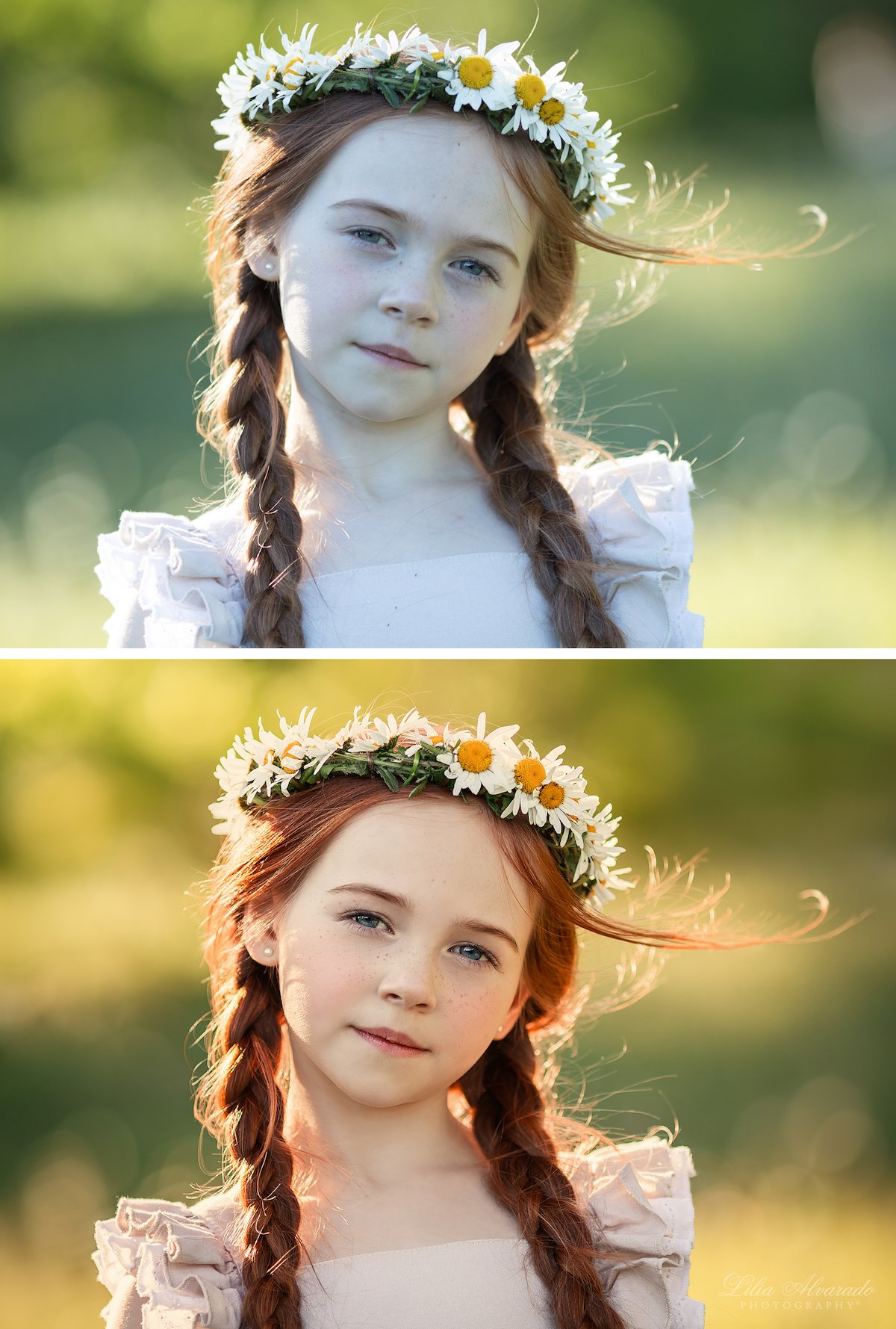
Photography & Image Manipulation Unlocks Creative Potential With Software
Photography, at its core, captures moments, light, and reality. But what happens when that reality isn't quite enough? What if you could bend light, defy gravity, or conjure fantastical beasts into existence with just a few clicks? This is the realm of Photography & Image Manipulation, a dynamic fusion where raw captured images meet the boundless possibilities of digital artistry. It's where snapshots transcend documentation to become narratives, dreams, and impossible scenarios, all brought to life through powerful software.
At a Glance: Key Takeaways
- Photo manipulation is an art form, dating back to photography's origins but revolutionized by modern software.
- Master artists like Erik Johansson, Anya Anti, and Rosie Hardy inspire new ways to tell stories and create surreal worlds.
- Software is essential for modern photographers, enabling everything from basic adjustments and organization to complex compositing and generative AI magic.
- Choosing the right tool depends on your skill level, budget, and creative goals, with options ranging from free web apps to industry-standard professional suites.
- Beginners have powerful, user-friendly options like Adobe Photoshop Elements or free alternatives like Photopea.
- Professionals rely on robust platforms such as Adobe Photoshop, Lightroom Classic, and Capture One for intricate detail and workflow management.
- Modern software leverages AI for incredible feats like object removal, sky replacement, and even generating entirely new image elements.
- Learning is an ongoing journey; start simple, experiment, and draw inspiration from the vast community of digital artists.
Beyond the Lens: The Evolving Art of Image Manipulation
For decades, photographers have subtly (and not-so-subtly) altered their images. Darkroom dodging and burning, hand-tinting, and montage techniques were the analog forerunners of today’s digital wizardry. The digital revolution, however, didn't just transform the process; it democratized it, making sophisticated manipulation accessible to anyone with a computer and a creative spark.
Today, image manipulation is less about "fixing" a photo and more about crafting a new reality. It's a powerful storytelling tool, a canvas for surrealism, and a medium for conceptual art that pushes the boundaries of imagination.
The Visionaries: Artists Who Redefine Reality
To truly grasp the potential of image manipulation, you need only look to the masters who practice it daily. These artists don't just edit photos; they build worlds, evoke emotions, and challenge perceptions, often sharing their behind-the-scenes processes to demystify their magic.
- Surreal Dreamweavers: Artists like Erik Johansson are celebrated for seamlessly blending multiple images into physically impossible yet incredibly realistic scenes, like unzipping a road or installing the moon. Similarly, Aydın Büyüktaş gained viral fame by bending aerial landscapes as if they were paper, using meticulous planning and 3D software. Their work makes you question what's real and what's meticulously constructed.
- Conceptual Storytellers: Anya Anti specializes in self-portraits that explore themes of isolation and responsibility, combining physical props with digital manipulation to create magical, grounded fantasy worlds. Rosie Hardy, another popular self-portrait artist, crafts dreamy settings and conceptual narratives, proving you don't need top-tier software (she often uses GIMP) to create stunning work.
- Mythical & Fantastical: If you're drawn to creatures and epic landscapes, artists like Robert Cornelius are masters. He draws inspiration from mythology and fairytales, populating ethereal landscapes with wild animals and mythical beings that blur the line between photography and digital painting. Julien Tabet takes wild animal photos and transforms them into fantasy-themed art reminiscent of Salvador Dali's surreal visions.
- Architects of the Impossible: Beyond grand scenes, some artists play with the mundane. Charlie Davoli juxtaposes two disparate ideas, like flip-flopping ground and sky, influenced by his diverse background. Jati Putra, a graphic designer, adapts existing images to defy perception, bending oceans at 90 degrees or making flat landscapes appear as 3D rectangles. These artists invite you to rethink everyday visual logic.
These are just a few of the 33 artists who are pushing the boundaries of what's possible in 2024. Their work is a testament to the fact that creativity, combined with the right tools, knows no bounds. Following their journeys can provide endless inspiration and often, valuable insights into their techniques. To truly dive into a world of endless possibilities, it's time to Explore your creative mode and see what you can create.
Your Digital Darkroom: Navigating Photo Editing Software
Modern digital cameras produce files packed with incredible detail and dynamic range, often in "raw" formats that require processing. This isn't a flaw; it's an opportunity. Software becomes your digital darkroom, allowing you to organize, optimize, correct, and ultimately, transform your images.
PCMag, with over 30 years of rigorous testing, consistently highlights Adobe Lightroom and Photoshop as Editors' Choice winners, setting the benchmark for the industry. But the landscape is rich with alternatives, each catering to different needs and budgets.
Choosing Your Tool: A Software Guide for Every Skill Level
Finding the "best" software isn't about the most expensive option; it's about the right fit for you. Consider your experience level, what you want to achieve, and your budget.
For the Absolute Beginner & Memory Keeper: Effortless Enhancements
If you're just starting, managing family photos, or want quick, impressive results without a steep learning curve, you have excellent options:
- OS-Included Apps (Apple Photos, Google Photos, Microsoft Photos): Don't underestimate these free tools. They offer basic organization, cropping, exposure/color adjustments, and increasingly, powerful AI features for quick fixes.
- Adobe Photoshop Elements: This is Adobe's robust, user-friendly answer for hobbyists. It packs many pro-level features but shines with its "Guided Edits" – step-by-step instructions for creating complex effects, filters, and layers. It's a one-time purchase, making it budget-friendly over time.
- CyberLink PhotoDirector: A strong contender for photo enthusiasts and social media posters, PhotoDirector combines Lightroom-like organization with Photoshop-like layer editing. Its intuitive interface and generative AI features make creative effects surprisingly easy to achieve.
For the Serious Amateur & Enthusiast: Workflow & Creative Flair
Ready to move beyond basic edits? These tools offer more control, advanced features, and often integrated cloud solutions for syncing your work across devices.
- Adobe Lightroom (Cloud-based): A streamlined version of its Classic counterpart, this Lightroom is perfect for serious amateurs. It offers most core editing tools, integrated cloud storage, advanced AI search (like face recognition), and robust community features. It's designed for seamless syncing across desktop, mobile, and web.
- Skylum Luminar Neo: Known for its innovative AI tools, Luminar Neo is a favorite among those who love unique filters and quick, powerful fixes. Features like power-line removal, twilight enhancers, and incredible sky replacement capabilities can transform a photo in seconds. It also works as a plug-in for Lightroom/Photoshop.
- Corel PaintShop Pro (Windows): A long-standing, affordable Photoshop alternative for Windows users. It offers advanced AI tools (background replacement, style transfer), brushes, layers, masks, and raw file support, making it great for budget-conscious users who need comprehensive raster and vector capabilities.
For the Aspiring Professional & Advanced User: Uncompromising Power
When your workflow demands precision, advanced raw processing, and the ultimate control, these are the industry workhorses.
- Adobe Lightroom Classic: The gold standard for professional photo workflow. It offers top-notch organization, state-of-the-art adjustments, raw file correction, advanced printing (including soft-proofing), tethered shooting, and extensive plug-in support. If your entire photography business revolves around managing and editing large volumes of images, this is your go-to.
- Capture One: Renowned for its superb detail extraction from raw camera files and industry-leading color rendition, especially for skin tones. Capture One is a favorite among studio photographers and those who demand the absolute best raw data interpretation. It boasts advanced layer and local adjustment tools, strong collaboration features, and robust tethered shooting.
- DxO PhotoLab: If noise reduction and pristine lens corrections are paramount, DxO PhotoLab is unparalleled. Its DeepPrime XD2s noise reduction and lens profile-based corrections can work wonders, especially in challenging lighting. It also offers automatic lighting correction (SmartLighting, ClearView) and can function as a plug-in for Lightroom/Photoshop.
The Industry Standard: Adobe Photoshop
No discussion of image manipulation is complete without Adobe Photoshop. It remains the world's most capable image editor, a true behemoth for commercial and artistic purposes. Photoshop excels at:
- Complex Layering & Masking: Essential for intricate compositing and non-destructive editing.
- Generative AI: Its "Generative Fill" and "Generative Expand" features can magically create new image elements, extend backgrounds, or remove objects with astounding realism.
- Advanced Tools: Every filter, gradient, shape, and text tool you could imagine, plus unparalleled drawing and painting capabilities.
- Plug-in Ecosystem: A vast array of third-party plug-ins further extends its power for effects, sharpening, noise reduction, and more.
While Photoshop offers robust features for sophisticated manipulation, it's often paired with workflow programs like Lightroom Classic or Capture One for organization and raw processing. A Photoshop-only subscription (with 100GB cloud storage) is around $263.88/year, though the Photography Plan (which includes Photoshop, both Lightroom versions, and 1TB storage) is a popular and more affordable choice at $238.99/year.
Free & Accessible Alternatives: Powerful Options for Every Budget
You don't need to spend a fortune to get started or even to do professional-grade work.
- Photopea: This free, browser-based online editor is a shockingly capable clone of Photoshop. If you need powerful layer-based editing without installing software, Photopea is an excellent choice. It handles various file formats, including PSD, and offers many advanced features. A $5/month subscription unlocks AI tools, more history, and storage.
- GIMP (GNU Image Manipulation Program): A free, open-source desktop program available for Linux, macOS, and Windows. GIMP is incredibly powerful and has a passionate community. While it lacks some of the usability comforts and seamless integration of commercial software, it's capable of complex tasks once you master its interface.
Key Software Features to Prioritize
When evaluating software, look for these capabilities to ensure you're equipped for both photography and image manipulation:
- Raw File Support: Essential for maximizing detail, color, and dynamic range from your camera.
- Non-Destructive Editing: Ensures your original image file is never altered, allowing you to revert changes at any time. This is fundamental for experimentation and professional workflows.
- Layering & Masking: The backbone of image manipulation. Layers allow you to combine multiple images or adjustments independently, while masks precisely control where those effects appear.
- AI-Powered Tools: From object removal (content-aware fill) and sky replacement to generative fill and intelligent selection tools, AI can dramatically speed up complex tasks and enable new creative possibilities.
- Organization & Workflow: Tools for cataloging, keyword tagging, face recognition, and quick searching are vital for managing a growing library of images.
- Plug-in Support: Third-party plug-ins can expand your software's capabilities with specialized filters, noise reduction, film emulation, and more. DxO ViewPoint, Nik Collection, and Topaz Photo AI are popular examples.
- Cloud Syncing: For mobile editing, backups, and collaborative work, cloud integration is a game-changer.
- Tethered Shooting: Important for studio photographers, allowing you to connect your camera directly to your computer to view and control shots in real-time (strong in Capture One and Lightroom Classic).
Beyond the Basics: Advanced Techniques and Creative Horizons
Once you've mastered the fundamentals of your chosen software, a whole new world of advanced techniques opens up, allowing for truly transformative image manipulation.
Compositing: Weaving Multiple Realities
This is where the magic of "impossible scenarios" truly happens. Compositing involves seamlessly blending elements from different photographs into a single, cohesive image. This requires:
- Meticulous Selection & Masking: Precisely isolating subjects and elements from their original backgrounds.
- Perspective Matching: Ensuring all elements appear to be from the same viewpoint and distance.
- Lighting Consistency: Matching light direction, intensity, and color temperature across all components.
- Color Grading & Tonal Blending: Adjusting colors and tones to create a unified look and feel, making disparate elements feel like they belong together.
Generative AI tools, like Photoshop's Generative Fill, are dramatically simplifying parts of this process, allowing you to extend backgrounds or integrate new elements with remarkable ease.
Color Grading & Tone Mapping: Setting the Mood
Beyond basic color correction, color grading allows you to infuse your images with specific moods and cinematic aesthetics. This involves:
- Hue, Saturation, Luminance (HSL) Adjustments: Fine-tuning specific color ranges.
- Split Toning: Adding different color casts to highlights and shadows.
- Lookup Tables (LUTs): Applying complex color transformations for specific filmic or stylized looks.
- Tone Curves: Precisely controlling the brightness and contrast of different tonal ranges to create deep shadows, bright highlights, or dramatic mid-tones.
These techniques are crucial for giving manipulated images a cohesive and professional finish.
Special Effects & AI Wizardry
Modern software isn't just about combining photos; it's about altering the very fabric of the image itself:
- HDR (High Dynamic Range): Merging multiple exposures to capture an extreme range of light and shadow, creating images with incredible detail in both bright and dark areas.
- Panoramas: Stitching together multiple photos to create ultra-wide landscapes, perfect for capturing expansive scenes that wouldn't fit in a single frame.
- AI Relight & Depth Mapping: Tools in software like Luminar Neo or Photoshop can intelligently relight a scene or generate depth maps, allowing you to apply realistic foreground/background blur after the shot.
- Content-Aware Tools: Beyond simple object removal, these tools can intelligently fill in missing areas of an image, matching texture, lighting, and tone.
Getting Started: Your First Steps into Image Manipulation
Feeling inspired? Here's how to begin your journey into photography and image manipulation:
- Start Small, Think Big: Don't try to recreate an Erik Johansson masterpiece on day one. Begin with simple adjustments, then try basic compositing (e.g., swapping a sky, adding a new object to a scene). Gradually build your skills.
- Pick Your Software & Learn It Deeply: Choose one tool (maybe Photoshop Elements, CyberLink PhotoDirector, or Photopea) and commit to learning its core features. Watch tutorials (many artists, like Daniel Serva and Rafy A, share behind-the-scenes videos on YouTube), read guides, and practice.
- Practice Regularly: Consistency is key. Even 15-30 minutes a few times a week can build muscle memory and understanding. Experiment with different photos and techniques.
- Draw Inspiration (and Recreate): Follow artists you admire (many of those mentioned earlier share their processes). Try to reverse-engineer their work or replicate specific effects you see. This is a powerful learning exercise.
- Experiment Fearlessly: The beauty of digital manipulation is that you can always undo. Don't be afraid to try wild ideas, push sliders to extremes, or combine unexpected elements. Some of the best discoveries come from happy accidents.
- Understand the Ethics: While image manipulation is a valid art form, it's crucial to be mindful of context. For journalistic or documentary photography, authenticity is paramount. For artistic expression, be transparent that your work is a creative interpretation. The goal is to craft art, not to deceive.
Common Questions & Misconceptions
Is image manipulation "cheating"?
No, not inherently. It's a creative tool. Just as painters use different brushes and mediums, photographers use various tools to express their vision. If the intent is artistic, expressive, or conceptual, manipulation is a legitimate and celebrated aspect of the craft. Where it becomes problematic is when it's used to misrepresent reality in contexts where accuracy is expected (e.g., news photography).
Do I need expensive software to get started?
Absolutely not. Free options like Photopea and GIMP are incredibly powerful. Adobe Photoshop Elements offers a comprehensive, one-time purchase solution. Many pros started with limited tools, proving that creativity and skill outweigh expensive gear.
How long does it take to learn image manipulation?
Learning the basics can take a few hours or days. Becoming proficient takes months of dedicated practice. Mastering it is an ongoing journey that can take years, as software evolves and new techniques emerge. Start with the fundamentals and enjoy the process of continuous learning.
What about mobile editing?
Mobile apps like Adobe Lightroom Mobile, Snapseed, and countless others offer surprisingly powerful editing capabilities on the go. While they may not have the granular control or layer complexity of desktop software, they're excellent for quick edits, social media, and even some creative manipulation.
Unleashing Your Creative Vision
Photography & Image Manipulation is more than a technical skill; it's a profound avenue for self-expression. It empowers you to transcend the limitations of a single moment captured by a lens and build entirely new visual narratives. From crafting evocative self-portraits that explore deep emotions to constructing fantastical worlds brimming with mythical creatures, the software at your fingertips is a gateway to limitless creative potential.
The journey starts with curiosity, fueled by inspiration from masters like Erik Johansson and Anya Anti, and realized through practice with tools like Adobe Photoshop, Lightroom, or even the free and capable Photopea. Don't wait for the "perfect shot"; create the perfect vision. It's time to download a trial, open a free editor, and embark on your own unique artistic adventure. It's time to Explore your creative mode and bring your wildest photographic dreams to life.